Home Game Dev Unreal Assets Unreal Engine Code Plugins Blockout Tools Plugin v5.7|Blockout Tools Plugin v5.7

Blockout Tools Plugin v5.7|Blockout Tools Plugin v5.7

4348 Views Stock 965 2026-04-24

Details
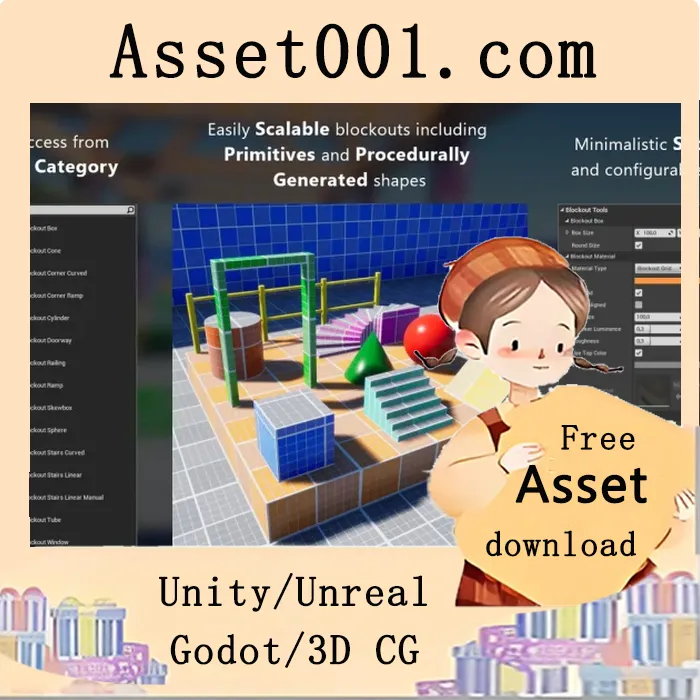
 A lightweight set of tools to quickly block out levels. Blockout Tools is a lightweight and extremely easy to use set of tools to quickly block out / greybox your levels in Unreal Engine 4 & 5. It consists of various primitive elements with convenient scale and transform controls and a custom triplanar grid material to ease the level design workflow. How to use: Select the new "Blockout Tools" custom category in Place Mode and just drag blockout types onto your level. Important note: this is not a modelling tool, the intended usage is to block out levels. It does not currently support boolean operations. Also, please be sure to check out an example map at "BlockoutToolsPlugin Content/Maps". Features: Easily scalable elements with either Vector 3D Widget or inside Details panel Super quick access to Blockouts from a new custom category in Place Mode Self-explanatory settings Configurable look and color of Blockouts Default Blockout Color, Grid Size and such can be configured in Project Settings Local-aligned triplanar grid material which supports object rotation World-aligned triplanar grid material Support for custom materials Lightweight 15 Blockouts Custom editor icons